We are happy to have been invited to the IEEE CSS Days 2026 on Wednesday the 21st of October at 19:30 UTC to talk about the Crazyflie in a controls context. The talk is 15 minutes long, including questions. We hope to see you there! Read on for more information about what the talk will contain…
Every now and then we get to interact with the community; our users, customers, ex-colleagues and others. You keep on inspiring us every time, and the discussions help us understand what you are doing in your work and where you are heading next, so that we can prioritise our work and efforts. We also enjoy sharing what is in our pipeline, what we are thinking about and how we imagine our products can be used to do awesome things. This talk will be such a session, with a focus on what improvements have been made lately to the Crazyflie ecosystem that can be interesting from a controls perspective.
IEEE CSS Days – what is it?
IEEE Control Systems Society (CSS) is the IEEE society dedicated to control systems engineering. Their flagship online showcase event, IEEE CSS Days, held 19-23 October, is virtual and free, and will highlight the society’s people, research, industry activities, community activities and more. All information can be found in the link. One of the sessions is “Technical Committee on System Identification and Adaptive Control Session”, and it is during this sessions that we have been invited to talk about the Crazyflie.
An overview of the talk
The title is “Advancements in the Crazyflie as a Testbed for Drone Control Research” – let’s break that down a little bit. We envision the Crazyflie to be a platform for trying new things; a canvas with just enough things premade for you to test your concepts with as little effort as possible. This is also true for the controls field. All the ideas floating around in the research community, and everything that has already been done, combined, intend to solve control problems at different levels and in different ways. We want to support as many ways of working as possible, and we believe we have lately done some advancements that can help you in your work. We want to share them with you, and are excited to see what cool things you can come up with using them.
Some examples of improvements
We are aware of that all of you will not be able to catch the CSS session. For that reason, here are some of the things that will be mentioned. If you have been reading the blog, you will probably recognise them:
Onboard, decentralised positioning – not really new, but something we keep coming back to when talking to the community. Lighthouse, which is laser-based, is still our highest performing positioning system. However, as we move into larger swarms, UWB has the advantage of not requiring line-of-sight between satellites and robot – this keeps Loco Positioning System interesting.
Bidirectional DSHOT and RPM telemetry – The Crazyflie Brushless now carries the possibility to get measurements of the rotor speeds. motorsGetRPM()in motors.c gives you what you need to get started.
cflib2 – The new, rust-powered cflib. It is already released (still on version 0, so expect API changes), and gives you performance and reliability boosts compared to the old cflib, and with more to come. Together with radio improvements, the radio performance has increased immensely: we have flown 49 drones on one Crazyradio in our flight lab. If you use Python for scripting, we highly recommend you try the new lib out.
As we move into bigger swarms, swarm management becomes a topic: Communication, monitoring, flashing and configuration. This is something that we are working on.
Let us know what you think of these improvements, when you start using them!
Event details
Here are the details for the talk:
Event: IEEE CSS Days Time: 21st of October, 19:30 UTC Speaker: Stefan Thorstenson Title: “Advancements in the Crazyflie as a Testbed for Drone Control Research”
We hope to see you there!
And, if not, we will hopefully catch you some other time. In the meantime, keep on letting us know what you are working on – we are always interested to hear about it and discuss.
On October 13–14, we’re heading to the WASP Academia and Industry Days 2026, where we’ll be exhibiting, meeting researchers and industry representatives, and taking part in the event’s speed dating sessions.
For those unfamiliar with WASP, the Wallenberg AI, Autonomous Systems and Software Program is Sweden’s largest individual research program, funded by the Knut and Alice Wallenberg Foundation. It brings together universities and industry to advance research in artificial intelligence, autonomous systems, and software, with a strong emphasis on scientific excellence and industrial relevance.
The annual Academia and Industry Days are an opportunity for these communities to meet, exchange ideas, and explore how research can lead to new applications and collaborations. This year’s theme, For the Betterment of Sweden, puts the focus on how advances in these fields can contribute to society and industry.
A flexible testbed for autonomous systems research
At Bitcraze, we’re particularly interested in how new ideas in autonomous systems can be explored, tested, and developed in practice. The Crazyflie platform has become a widely used research tool in this field, supporting everything from flight control and navigation to multi-agent coordination and swarm robotics.
Crazyflie is more than a small flying robot. It’s a purpose-built, open-source research platform designed to make experimentation accessible and flexible. Its modular hardware, open software stack, and supporting ecosystem allow researchers to develop and test their own algorithms, integrate new sensors, and move from simulation to physical experiments without having to build an entire robotic system from scratch.
With Crazyflie used in hundreds of scientific publications and research projects worldwide, we’re pleased to see how the platform continues to support new ideas and discoveries. Many of the challenges being explored also have clear connections to industrial applications, making WASP Academia and Industry Days a particularly interesting place for us to exchange experiences and explore new opportunities.
Let’s meet in Stockholm
We’ll be exhibiting throughout the event and participating in the speed dating sessions, where we hope to connect with researchers working on interesting robotics challenges.
We’re looking forward to hearing what others are working on, exchanging experiences, and exploring where our platform and expertise might contribute. Perhaps some of those conversations will lead to new collaborations, research projects, or applications we haven’t considered yet.
If you’re attending WASP Academia and Industry Days, come by our stand and say hello to Enya and Fredrik!
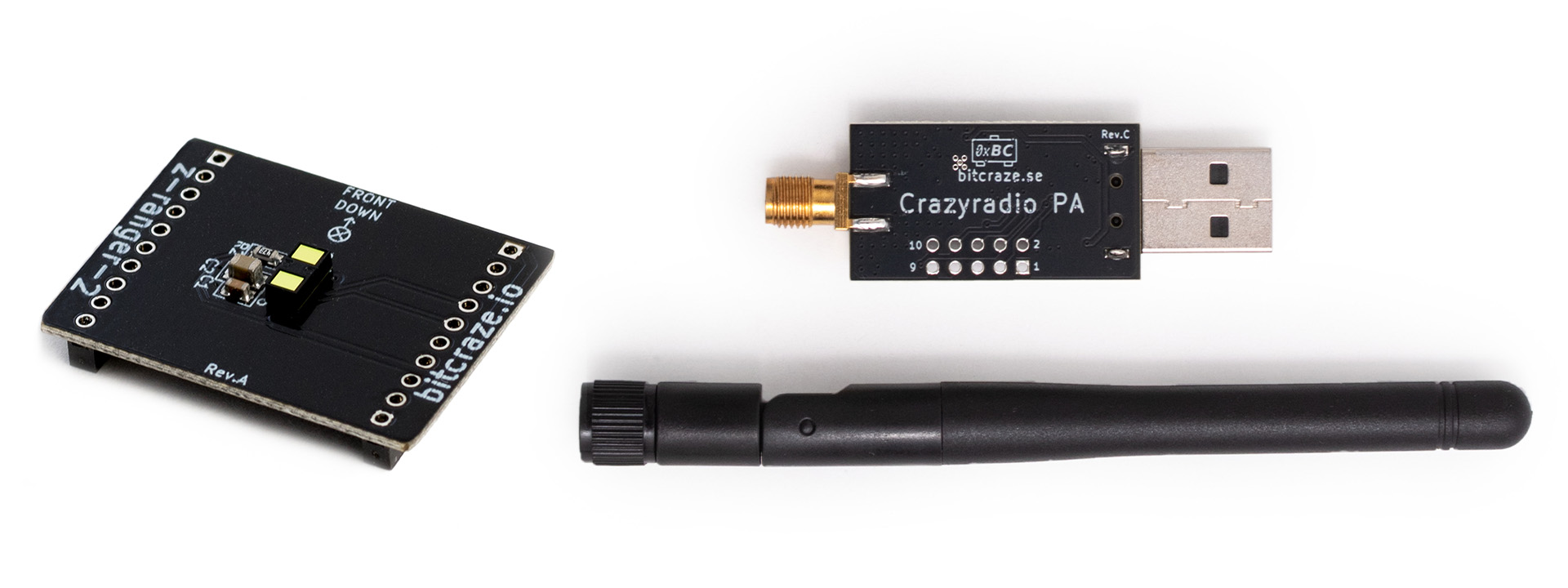
And so, two of our products have reached the end of the road. This time it is the Z-ranger deck v2 and the Crazyradio PA. Both have now been discontinued, and our remaining stock has run out.
This is not a particularly dramatic change. Both products already have well-established successors, and much of what they enabled has simply become part of the next generation of the ecosystem. Still, they have been around for quite a while, so here’s a proper goodbye.
Z-ranger deck v2: knowing where the floor is
The idea behind the Z-ranger was simple: point a distance sensor downwards and give the Crazyflie a good measurement of its height above the ground. It enabled accurate height hold without an external positioning system and became a building block for early autonomous flight experiments.
The original Z-ranger used the VL53L0x Time-of-Flight sensor. In 2018 we introduced the Z-ranger deck v2, together with the Flow deck v2, using the newer VL53L1x sensor and extending the useful ranging distance. The Z-ranger v2 could measure the distance to the ground up to 4 metres.
There was always a close relationship between the Z-ranger and the Flow deck. The two decks share the same basic downward-facing ranging functionality, but the difference is that the Flow deck v2 also contains a PMW3901 optical flow sensor, allowing the Crazyflie to measure horizontal movement relative to the ground.
Over time, that has made the Flow deck the more useful general-purpose solution. You get the ground-distance measurement of the Z-ranger, but also the motion information needed for position hold and autonomous movement in X and Y.
Rather than maintaining two products with overlapping functionality, we are consolidating around the Flow deck v2. For existing Z-ranger users, nothing suddenly stops working. The firmware support remains, and there is no reason to replace a Z-ranger that is already doing its job in an experiment. For new setups, however, the the Flow deck v2 is now the natural choice.
Crazyradio PA: a small USB dongle that did a lot of work
The second product leaving the store is the Crazyradio PA. It has been our main USB radio dongle for communicating with Crazyflies for many years. Based on the nRF24LU1+, with a power amplifier providing up to 20 dBm output power, it provided the communication link behind everything from someone flying their first Crazyflie to fairly substantial research swarms.
By 2023, though, the nRF24LU1+ platform was becoming increasingly limiting for what we wanted to do next. That led to Crazyradio 2.0, based on the much more capable nRF52840. From the beginning, Crazyradio 2.0 was designed both as a replacement for Crazyradio PA and as a platform on which we could continue developing the communication side of the Crazyflie ecosystem. The nRF52840 gives us substantially more processing power, memory and radio flexibility, as well as a more convenient bootloader and room to experiment with new communication protocols and scheduling strategies.
Earlier this year, for example, we flew 49 Crazyflie 2.1 Brushless drones using a single Crazyradio 2.0 while testing cflib2 and improvements to the radio firmware. That is a useful illustration of why moving the radio platform forward matters: communication is part of the research infrastructure too, especially when experiments start scaling from one robot to many.
What changes for existing users?
Not very much is changing for existing users. If you already have a Z-ranger deck v2 or Crazyradio PA, you can continue using them. Discontinuation does not mean that they suddenly become incompatible with the Crazyflie ecosystem.
For new setups, however, use the Flow deck v2 for downward ranging capability and optical flow measurement.
And as far as a radio goes, the Crazyradio 2.0 is the only alternative on which ongoing communication development is focused.
Since a while back now we’ve been developing our Crazyflie CLI, a command-line client used for all things Crazyflie. The goal of the project has been to easily do simpler things with the Crazyflie without having to open the UI all the time during our development. During the development and testing of the new Crazyflie Rust library the CLI has also been used to exercise lots of the functionality before porting our main client over to it.
Features
Since the CLI has mainly worked as an internal tool for us, the feature set is growing to accommodate daily development use for us. That being said there’s lots of features that’s useful for all of our users outside Bitcraze as well. Here’s a few highlighted features:
Display the Crazyflie console
Logging and parameter sub-system access (i.e log variables and get/set parameters)
Flash firmware (nRF51/STM32 and decks)
Memory sub-system access (i.e read, write and display memory contents)
Access to Lighthouse / Loco configuration (i.e read, write and display configuration settings)
Power management (i.e on, off, sleep, reboot)
Interactivity and usability
To make CLI quick and easy to use, even for seldom used commands, we’ve added the following design features:
Documentation built it: The CLI itself has documentation and examples for commands, they can be access by writing the command+help or just leaving the command blank, for example just writing cfcli platform will list all the platform sub-commands.
Auto-complete on commands, arguments and parameter/log names: Although the CLI has documentation build it can be quicker to use tab to list commands and options if you already know what the commands do but you forgot what they are exactly or if you’re in a hurry.
Prompt the user if there’s multiple options: If you do not explicitly select an option, and there’s more than one, then you will be prompted. One example is the command cfcli log print, where if you do not specify what variables to log you will get an interactive list. Another example is cfcli bootload flash –bin firmware.bin, where it’s not specified where to flash the binary so you will be prompted to select where to flash it.
Stable CSV printouts: Although formatting of command outputs might change over time, the goal is to keep the CSV output stable to more easily use the out of the CLI as input for scripts and other programs. To enable CSV output format add the –csv option at the end of a command, like cfcli log print stabilizer.roll,stabilizer.pitch,stabilizer.yaw –csv
Package distribution
To make it easier for our users to install the CLI, and more importantly keep it up to date, we’ve decided to distribute it via package managers instead of only via a binary. On the projct page on Github you can find documentation on how to add the apt repo and brew tap. Remember to restart the terminal to get auto completion.
Examples
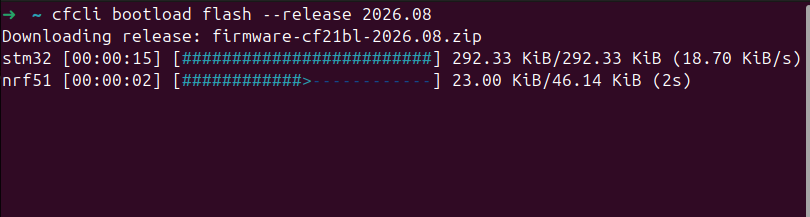
The intended way of using the cfcli is to first set it to use a specific Crazyflie (either via USB or radio) after which you do not have to specify the URI anymore, here’s a typical example of loading the 2026.08 release onto a Crazyflie which is connected via USB and you have a Crazyradio attached (you need this for flashing STM32/nRF firmware):
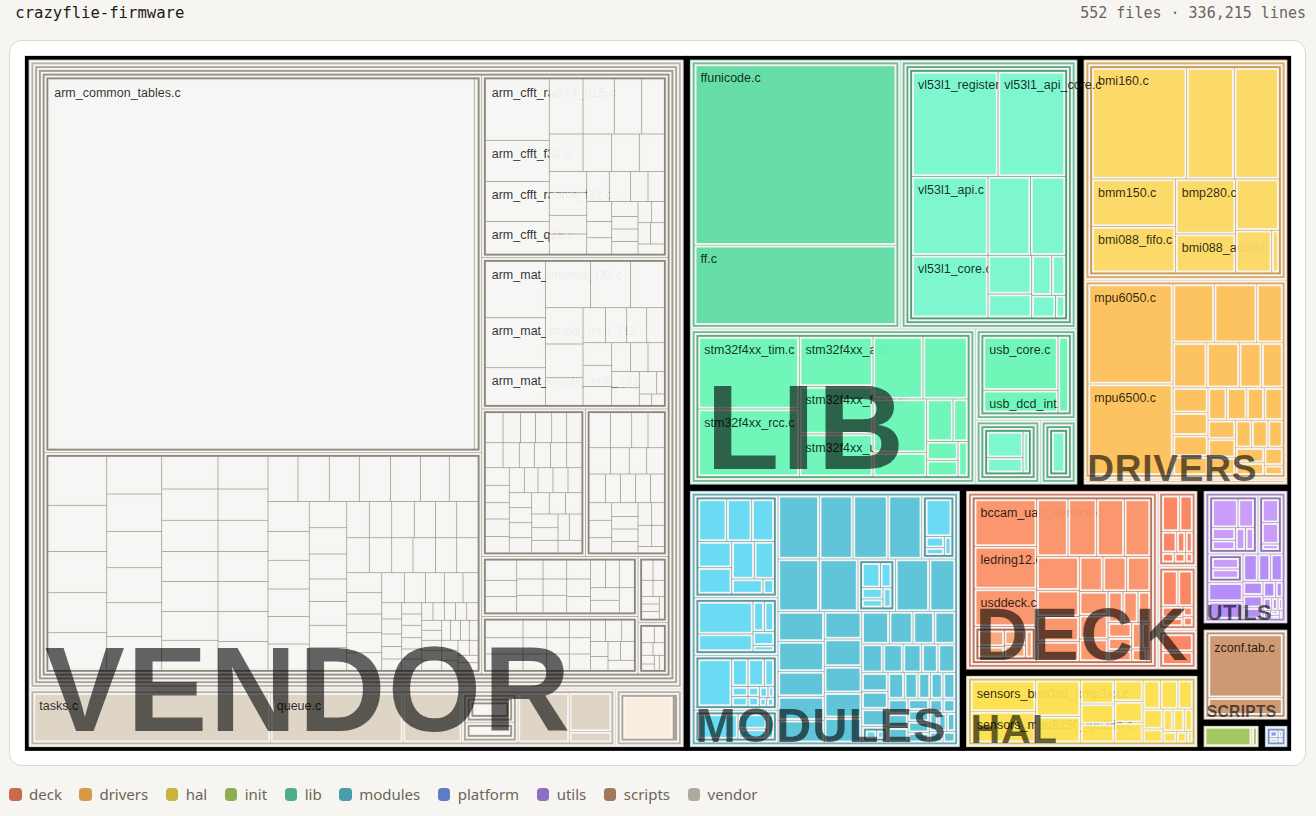
Most of us who work on Crazyflie firmware live in one corner of it at a time — a driver here, a control loop there — and rarely step back to see the whole tree at once. We built a treemap of the firmware to do exactly that: one picture, every source file, sized by how much code it actually is and grouped by the directory it lives in. It makes you realize how much is going on in the firmware to make your part work.
How the map was built
The map straight out of a real build: for the cf2 target, we let Kbuild run to completion and then read its own .cmd files, the bookkeeping Kbuild already writes for every compiled object, recording exactly which source file produced it. Group those files by their top-level directory under src/ — deck, drivers, hal, init, lib, modules, platform, utils — plus vendor and scripts alongside, size each tile by lines of code, and the tree draws itself.
The treemap
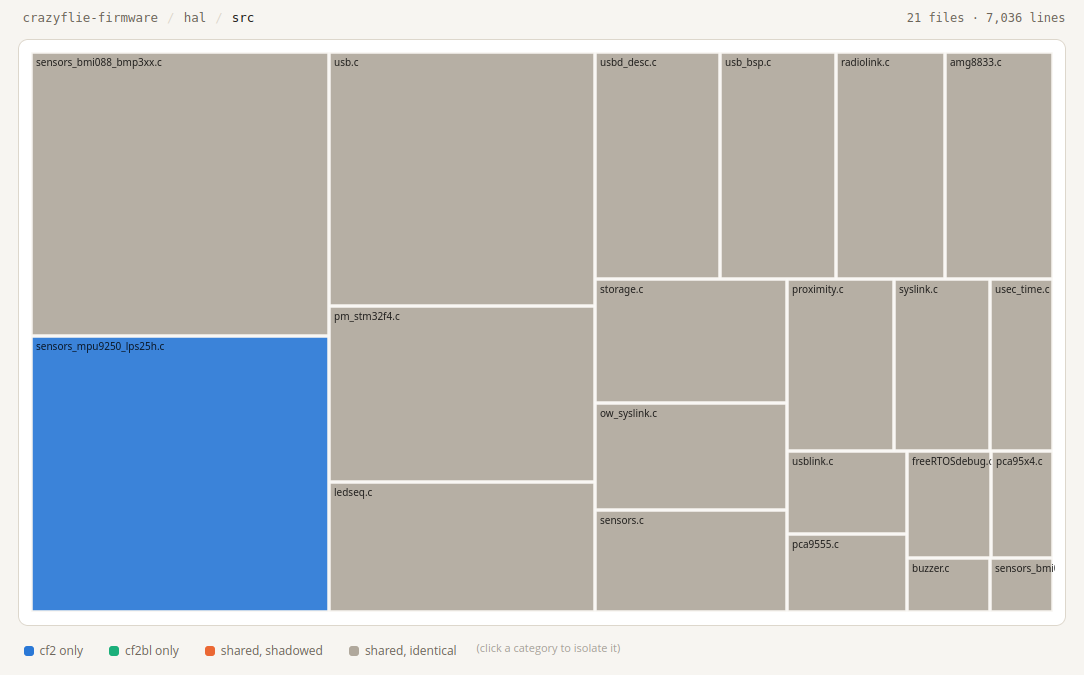
Below is the top-level view of the crazyflie-firmware. Quite beautiful, right? We think so, at least. It contains years of work from the Bitcraze team and all of you out there who have directly contributed or indirectly by finding bugs and asking for new features.
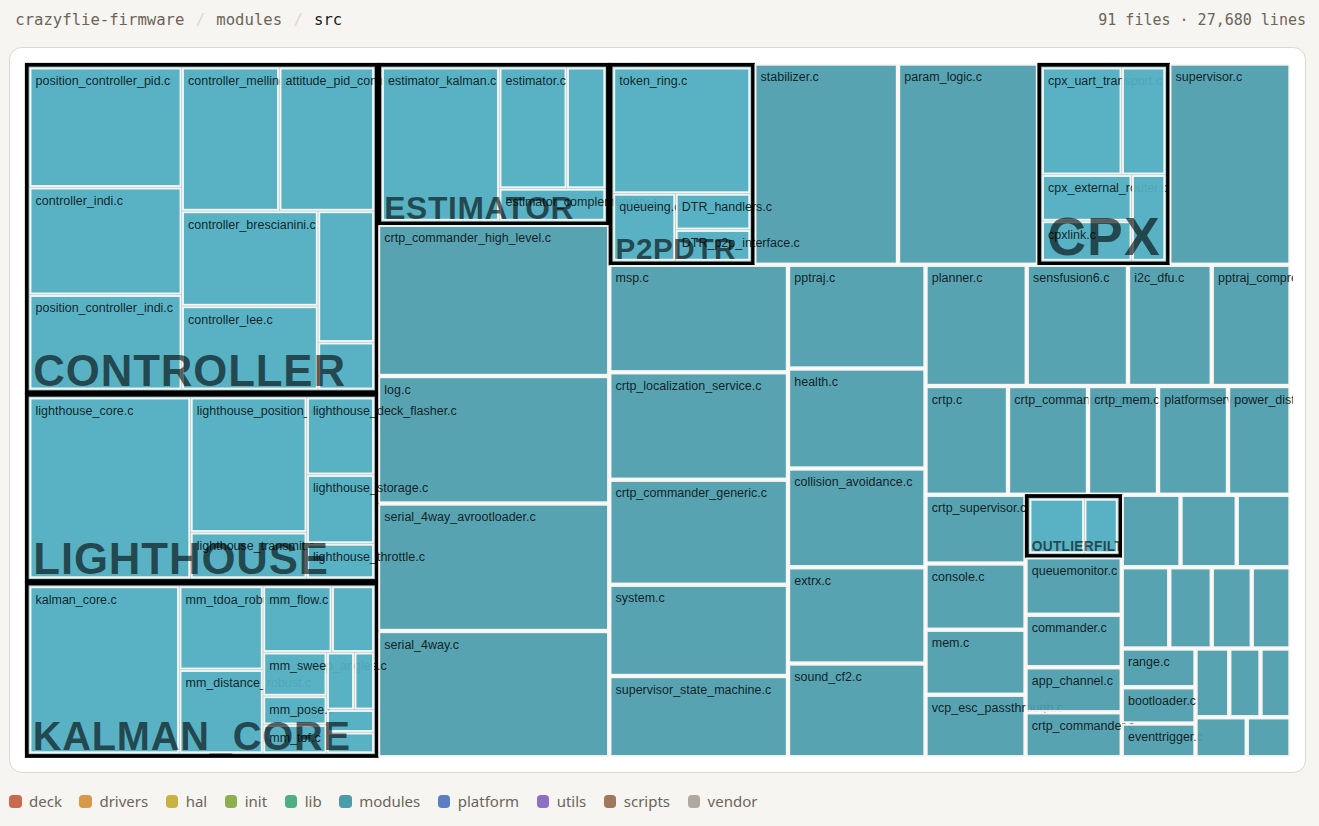
Click into modules/src and it’s 91 files, 27,680 lines — the flight logic. hal/src is leaner: 21 files, 7,036 lines, sitting right above the raw drivers.
Walking the tree
Ordered the way the map itself reads, biggest tile first:
vendor — a second, separate pile of third-party code (FreeRTOS itself, libdw1000, test frameworks), distinct from lib.
lib — vendored third-party libraries the firmware builds on (the STM32 standard peripheral library, CMSIS, FatFS, Segger RTT).
modules — the flight logic: commander, controller, state estimator, Kalman filter, CRTP handling.
deck — drivers for the decks (flow deck, lighthouse, LED ring, and the rest), detected and brought up at runtime.
hal — the hardware abstraction layer sitting above the raw drivers (sensor fusion input, power management, storage) that the rest of the firmware calls into.
utils — small shared helpers used across the rest of the tree: CRC, PID, filters, assertions.
scripts — build tooling (Kconfig, Makefiles, dependency-checking scripts). Sized like everything else, but none of it is actually compiled into the firmware.
platform and init are in there too, but at this scale they barely register as pixels — more on why that’s fitting below.
Some observations
Diff two builds instead of looking at just one, and a couple of things pop out that are easy to state but satisfying to actually go and check.
CF2 vs. CF2.1 Brushless. These are two different physical boards, but walk the diff and the only directories where a single file differs are hal/src and platform/src. Everything else in the tree — all of modules, all of drivers, all of lib — is the same source code, regardless of whether it ends up on a brushed or a brushless frame. The resulting code differs mainly due to the configuration found in e.g. platform_defaults_cf2.h.
sensors_mpy9250_lps25h.c in the bottom left corner is not compiled into the Brushless – it does not have those sensors. The same is true for Crazyflie 2.1. However, the Crazyflie 2.0 has these sensors. The sensor setting is selected at runtime, which is why you can flash your CF2.0 and CF2.1 with the same firmware.
Every controller ships in every build.modules/src has a whole cluster of controllers sitting side by side — PID, Mellinger, INDI, Brescianini, Lee — and all of them get compiled in. Which controller actually flies the drone is a parameter you can flip at runtime.
Closing thoughts
Line them all up and the codebase is huge, but the part of it that’s actually specific to one physical board is tiny. platform and init — the directories that differ per board and handle bringing the system up — barely show up next to vendor and modules. That’s easy to feel intuitively after enough time in the codebase, and much easier to actually see laid out flat like this.
It would take a long time to work your way through every corner of this tree, if you ever fully do. The tool that generates this map can be found here, and it works on one or two (compare) Kbuild targets. It already has compiled examples.
Is this an interesting way to look at a codebase you already partly know? And now that it’s laid out flat in front of you — is there anything in here that looks like it could use some tidying up? We’d like to hear about it.
We try to keep up with recent research using the Crazyflie®. We read a lot of papers and check out new GitHub projects, controllers, and simulators. Sometimes the topics are straightforward and sometimes we learn new things from completely unexpected angles. It is such a treat to see where the community is heading, and it helps us prioritize our own work, from new features and functionality to the hardware we develop next.
Most of the time we look at the Crazyflie applicability close up, but two recent studies in particular put it into a bigger context:
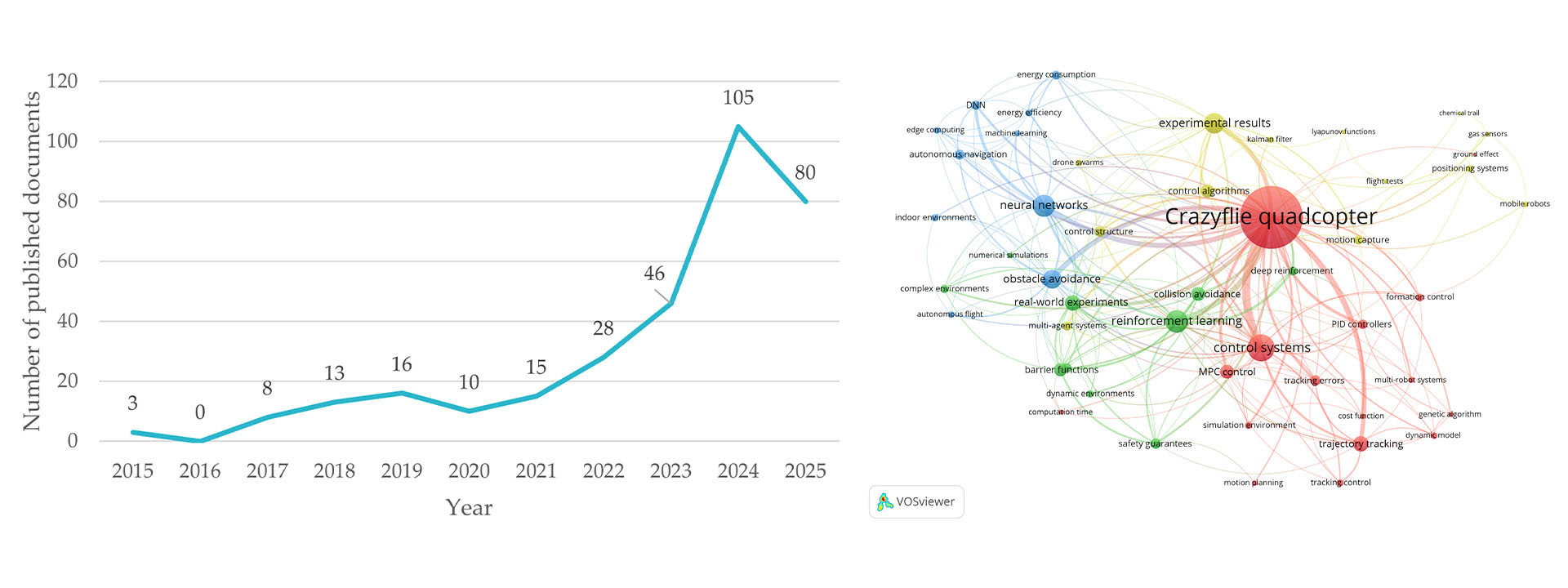
In their 2026 A Scoping Review of the Crazyflie Ecosystem: An Evaluation of an Open-Source Platform for Nano-Aerial Robotics Research paper, Rareș Crăciun and Adrian Burlacu reviewed the Crazyflie research ecosystem from 2015 to 2025. They identified 321 studies across 183 publication venues, with research spanning control, navigation, swarms, localization, sensing, AI, safety and simulation. The number of publications has grown quickly too, reaching 105 papers in 2024. The authors calculate an annual publication growth rate of 38.9%.
The institutions represented include ETH Zurich, University of Bologna, TU Delft, Università della Svizzera italiana, Tsinghua University and University of Toronto, among many others. For us, the breadth is at least as interesting as the number of papers. The same underlying platform is being used to investigate quite different research questions.
In their 2026 NanoCockpit: Performance-optimized Application Framework for AI-based Autonomous Nanorobotics paper, Elia Cereda, Alessandro Giusti and Daniele Palossi took a different approach. They surveyed nano-quadrotor research from 2020 to 2024, using Scopus as the primary source and manually reviewed the publications to identify the platforms being used. Their final dataset contains 586 relevant publications and the Crazyflie was used in 381 of them, or 65%. DJI Tello was second with 128 publications, or 21%, followed by Parrot Mambo with 50.
Cereda, Giusti and Palossi describe Crazyflie as the de facto standard platform for nano-robotics research. We’re as vain as the next guy, but we’re mostly interested in what researchers actually benefit from, namely a shared research platform that becomes more useful as the body of reproducible work, software and experimental knowledge around it grows.
Figures from Crăciun & Burlacu (2026), A Scoping Review of the Crazyflie Ecosystem. CC BY 4.0.
Software momentum in the community
The Crazyflie firmware has now accumulated more than 4,000 commits. The repository has around 1,500 stars and more than 1,200 forks, and Bitcraze currently maintains 77 public repositories around the ecosystem.
Some of that work is ours, but a lot of the interesting stuff isn’t. Researchers and developers have contributed controllers, estimators, positioning methods, simulation environments, swarm tools, drivers, fixes and documentation, and many projects live outside our repositories but build directly on the platform.
NanoCockpit is a good example. The researchers took the Crazyflie and AI-deck, found ways to use the available computing resources more effectively, and demonstrated the resulting framework on applications including human pose estimation, relative localization and autonomous drone racing.
Someone else can now build on that, which is what makes the ecosystem useful.
A foundation to build on
The Crazyflie a researcher starts with today is not just the hardware we designed. It comes with years of firmware development, libraries, positioning systems, simulation tools, documentation and published experimental work. Each contribution adds a little more to that foundation, and over time, that compounds.
To everyone who has published with Crazyflie, contributed code, shared a tool, reported a bug, documented an experiment or pushed the platform into a research area we hadn’t anticipated: thank you.
You’re not just using the Crazyflie ecosystem. You’re helping build it.
What does it take to bring a new coordination stack to the Crazyflie? In this guest post, Jim Steele, founder of Tapestry OS, shares his experience building a Zephyr-based firmware port for the Crazyflie 2.1 Brushless and using it to explore decentralized coordination with three drones. We’re happy to welcome Jimto the blog to share the work and what he learned along the way.
The Crazyflie platform has an excellent answer to the question of how to fly a drone autonomously. The firmware is well-documented and actively maintained with hardware abstraction, sensor drivers, and state estimators providing solid infrastructure that a research team can build on confidently.
The question I kept running into is one layer above that: once you have drones that can fly reliably, how do you coordinate what a collective of them does together? Not at the trajectory level (Crazyswarm2 handles that well) but at the level of distributed state: what does each drone know about where the others are, how fresh is that information, and how does the collective continue functioning correctly when a drone fails or communication is interrupted?
Most research teams answer this question by writing custom coordination firmware specific to their experiment. The result works, but it does not transfer to the next experiment or the next platform. I wanted an answer that would.
Tapestry OS provides this layer as an open-source coordination stack built on Zephyr RTOS. It includes a distributed world model, gossip-based state propagation, fault-tolerant consensus, and a declarative application API that lets domain experts express collective behavior without touching the underlying firmware. This post is about porting Tapestry to the Crazyflie 2.1 Brushless and validating its core coordination claim on three drones flying in collective formation.
The port
Tapestry’s stack has seven layers, L1 through L7. For the Crazyflie port, the work lives in L1: the Physical Substrate Interface, Tapestry’s equivalent of a board support package. We began by developing a native Zephyr port for the Crazyflie 2.1 Brushless. This had to include the flight control itself: attitude (rate + angle), altitude-hold, position-hold loops, sensor drivers, and a Lighthouse V2 deck driver. Bitcraze stock firmware was an invaluable reference (the control cascade architecture and the Lighthouse calibration math especially) though Tapestry’s implementation is written from scratch and shares no code with it.
Bring-up including L2 had some surprises, including two real bugs in Zephyr’s STM32 I2C driver that the Tapestry repository carries as patches until they are upstreamed. Streaming console output over the Crazyradio early in the port made debugging much less painful.
Lighthouse positioning took the longest. The interesting problems were pairing the base station’s sweep planes correctly from raw deck timestamps, and rejecting phantom rays from specular room reflections. The eventual implemented solution gates rays against the base station’s optical field of view (a hardware constant that survives recalibration) plus triangulation-consistency and rate-of-motion checks. Once resolved, position accuracy is solid.
Tapestry’s higher layers, including the L3 gossip transport and the L4 Collective State Manager, required no changes. That is the point: once the foundation is in place, the coordination logic does not care whether it is running on a ground robot or a drone.
The formation demo
Three Crazyflie 2.1 Brushless drones, each running Zephyr with the Tapestry substrate and collective world model, were flown in a simple formation. Each drone reads its own absolute position from the Lighthouse deck and gossips it to its peers every 500 ms over the nRF51’s peer-to-peer radio channel. The resulting world model holds fresh entries for its two peers, with staleness tracking, and continually compares its distance to each fresh peer against a target spacing: too close pushes away, too far pulls closer.
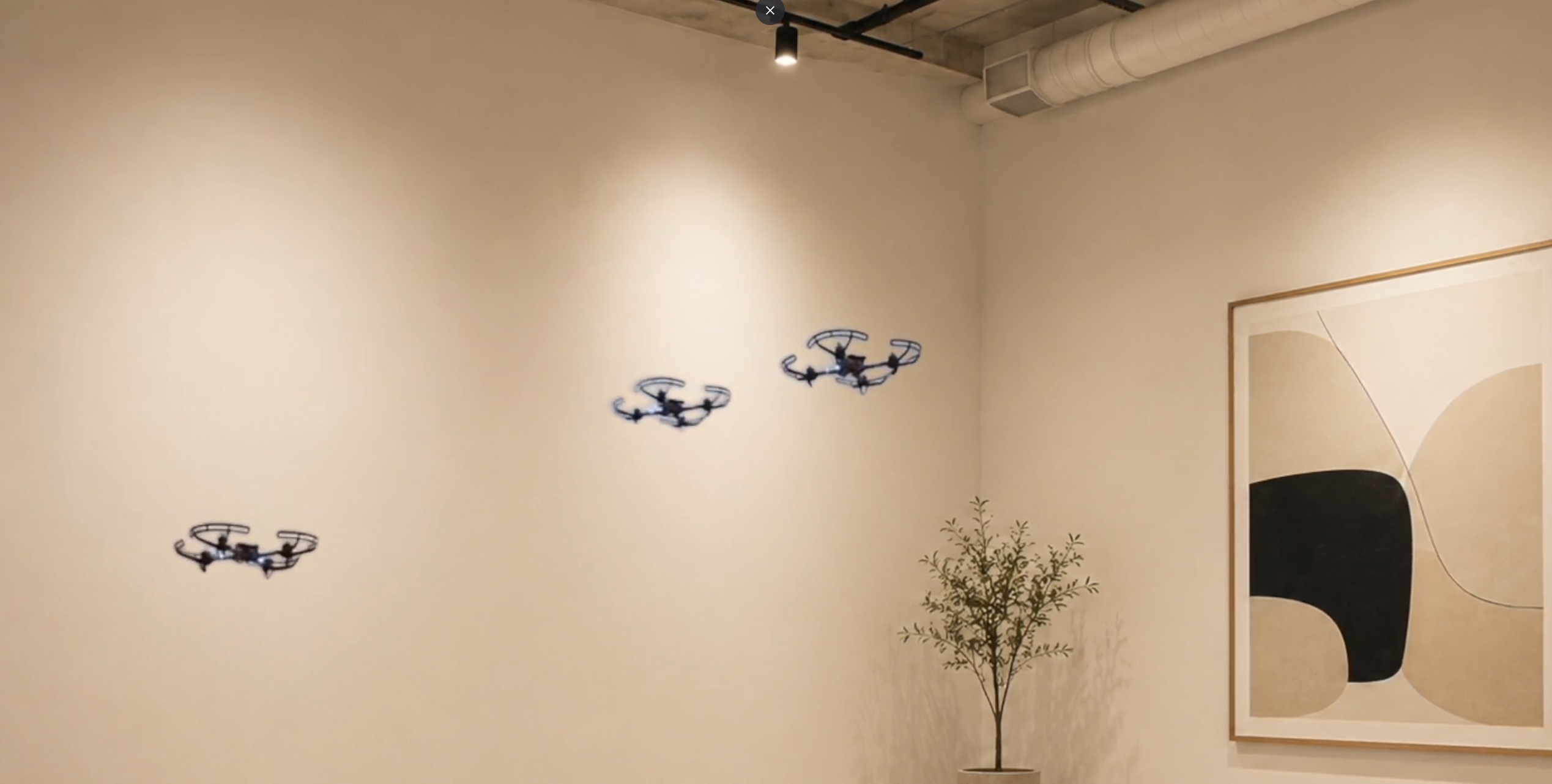
The example formation in the following video shows two drones hover and align in equilibrium. When a third powers on and flies among them, the three maintain separation until the third drone ends its mission, lands itself, and the remaining two close back into their line before landing.
There is no leader, no ground station, and no phase script: each drone runs Tapestry’s decentralized world model and shares only its own position over gossip. The recovery behavior is the part to watch closely. When one drone ends its mission, it lands and goes silent. The remaining two re-form their line about ten seconds after the departure, without any instruction from an external system. This is deliberately the same code path that would handle a real mid-flight interruption.
This is Tapestry’s first demonstration on real Crazyflie drones: a coherent shared understanding of collective state, maintained entirely through peer-to-peer gossip, driving behavior through local rules. The demo logic can be expressed as a declarative L7 Choreo with the Tapestry SDK without touching firmware.
What is available
The Crazyflie 2.1 Brushless support is in the Tapestry OS repository under Apache 2.0. It includes the steps to recreate this demo: per-drone configuration, Lighthouse calibration, and ESC provisioning.
This is an initial port. We chose Zephyr to unlock a standardized, scalable ecosystem that allows the Crazyflie to integrate with industrial-grade RTOS tooling. We chose standard PWM for this port to simplify the initial Zephyr hardware abstraction with a stable and reliable baseline for our formation coordination logic. A number of Crazyflie capabilities are not yet available on the Zephyr-based stack (Kalman estimation, flow deck, and DSHOT among them), and contributions are welcome.
If you are doing swarm research on the Crazyflie and want coordination infrastructure you do not have to build yourself, the Tapestry repository is a good starting point. Try the port, open an issue if you hit hardware-specific bugs, and share your formation experiments on GitHub or in the Bitcraze forum.
If you have set up a Lighthouse positioning system with the Crazyflie before, you are familiar with the geometry estimation step. Walking around the room holding a Crazyflie, clicking a few buttons in a wizard dialog, and hoping that at the end you get a working configuration defining a global coordinate system.
The last part – the hoping – is what we have been working on fixing.
The problem with the old wizard
The old geometry estimation wizard did the job, but it felt like a black box. You would follow the steps, add multiple samples, click “estimate geometry” and wait. If the wizard failed, either by returning a clearly wrong estimation or by not returning anything at all, you got very little information to go on. Was it a bad sample? Was the line of sight of a base station blocked? The only real solution was to clear everything and start the entire process from scratch.
We wanted geometry estimation to feel less unpredictable, and more like a process you can actually see, steer, and understand.
What’s new?
Continuous geometry estimation.
Sample collection and modification.
Live feedback during geometry estimation.
Verification samples.
Updated UI.
Continuous geometry estimation
One of the biggest changes is found underneath: geometry estimation now runs continuously in the background. Every time you add a sample, the solver recomputes the geometry right away, using whatever data you’ve collected so far. That means you get live feedback instead of a final verdict, helping you understand if the last change you made improved the geometry estimation or not.
Sample collection and modification
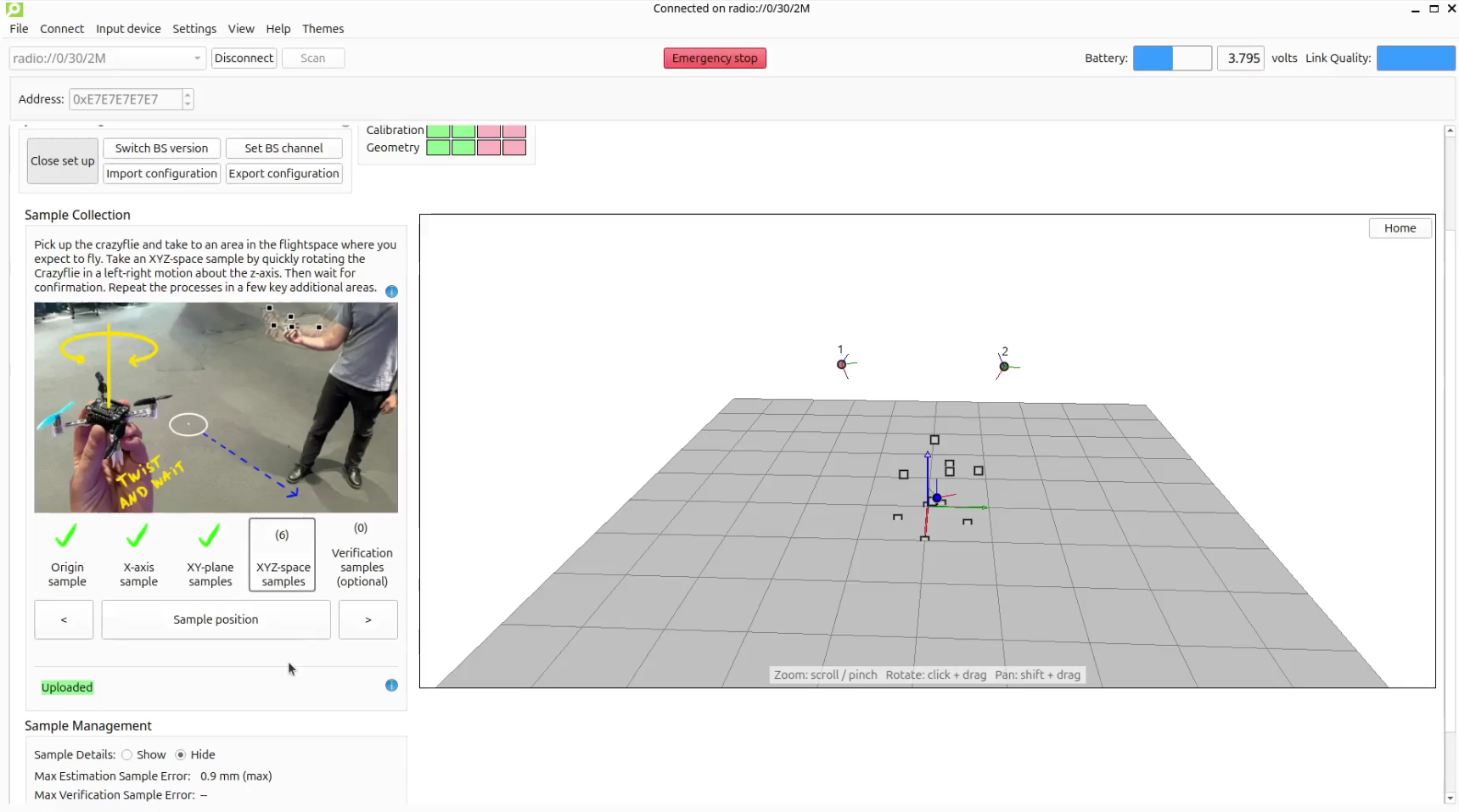
The sample collection process has become more controlled. XYZ-space samples are no longer logged passively as you move the Crazyflie around the room. Instead, you collect each one separately by quickly rotating the Crazyflie at the required point.
Additionally, you can now access the data used for the geometry estimation. All recorded samples remain available, so you can modify them at any time. Any changes are automatically reflected in the geometry estimation, making it easy to correct mistakes or refine the result.
Being able to modify the samples, opens up workflows that were previously impossible. For example, moving the origin of the coordinate system or re-aligning the X-axis becomes as simple as collecting new samples. Similarly, if a base station is replaced or has moved, you can delete it and add the new or updated one by collecting only a few additional samples.
Live feedback during geometry estimation
When setting up the lighthouse system, a status line tells you where things stand at all times: “Not enough samples” when the solver needs more data, “Updating…” when the solver is updating the geometry, “Uploading…” when the updated geometry is being written to the Crazyflie, and “Uploaded” when it’s confirmed. No more waiting with bated breath.
Whilst the live feedback avoids a heavily weighed pass-fail condition, much like the old system it does not guarantee that a truly accurate estimation has been uploaded to the Crazyflie, this is where the verification samples come into play.
Verification samples
This is one of the biggest advantages of this update. In addition to the samples used to estimate the geometry (estimation samples), you can now take verification samples. These are extra samples taken the same way, but not used for the estimation, giving you an independent check on how well the base stations agree on each verification sample’s position.
Previously, the only way to know if your geometry was actually good enough to fly on was to fly and see. Now the max verification sample error gives you a rough read on the quality of the geometry before the Crazyflie takes off. Then, if a particular part of the flight space isn’t well covered, you can add a few more XYZ-space samples to improve it.
Updated UI
The new workflow required a major update to the UI. We aimed to make it easier to adapt the system to your needs. This is done by having the ability to retrace your steps, allowing for more control during the set-up process. The design also has larger focus on guidance and feedback with more detailed graphics to guide you through and extra large visual confirmation for when you are collecting samples away form your screen. Additionally, the buzzer deck and any of the LED decks can now also provide confirmation.
The geometry estimation now lives directly in the Lighthouse Positioning tab instead of in a separate dialog. Click “Start set up” and the tab expands with a sample collection section, a 3D view of your base stations and samples, and (optionally) detailed tables of everything that’s been recorded.
We’re happy to announce that release 2026.08 is now available. This update ships a reworked lighthouse geometry estimator with a redesigned interactive Lighthouse tab, bidirectional DSHOT RPM telemetry, and a new deck supervisor for runtime deck health monitoring, along with a number of smaller bug fixes and quality-of-life improvements. Alongside the release, we’ve also shipped a fix for a long-standing lighthouse FPGA decode issue affecting simultaneous sensor hits. Thanks to our community contributors for their valuable additions to this release.
Major updates
Lighthouse geometry estimator rework A large rework of the lighthouse base station geometry estimation (cflib + cfclient), replacing the old batch estimation script with a continuous, interactive workflow built into the client. Base stations and samples can now be added, removed, and verified live during a session, while the updated UI provides a live status feedback. Thanks to @krichardsson and @cafeciaojoe for their work in this project.
Bidirectional DSHOT and RPM telemetry Motors driven over bidirectional DSHOT can now report their measured RPM back to the firmware. This feeds both telemetry and a new arming check: each motor is spun up and confirmed to actually be turning at the requested RPM before arming is allowed, catching a disconnected or seized motor before takeoff instead of after. Thanks to @EliaCareda for this contribution.
Deck supervisor A new deck supervisor subsystem continuously monitors deck health at runtime, mirroring the role the platform supervisor plays for the flight controller itself. A deck that stops responding or reports a fault now surfaces an explicit error code instead of a simple alive/not-alive flag, so problems can be diagnosed rather than just detected.
Radio platform-packet handling moved into the nRF51 interrupt All null CRTP platform packets — P2P, battery-voltage polling, bootloader, radio commands, safelink init — are now handled entirely inside the nRF51’s radio interrupt handler instead of being passed through safelink to the STM32. Battery-voltage queries in particular are answered directly from a packet rebuilt every ADC cycle, keeping this traffic off the application processor and giving these commands a fast, consistent response path.
Lighthouse FPGA: simultaneous sensor hit decode fix Fixes a bug where a sweep crossing two sensors at (nearly) the same instant broke LFSR channel decoding and caused the firmware to discard the entire sweep block. This update belongs to the lighthouse-fpga repository. You can update your Lighthouse deck by flashing the 2026.08 release firmware via cfclient.
Persistent parameters settable from apps Parameters marked PARAM_PERSISTENT can now be set from firmware apps, not just from a connected client, and their stored value is enforced/restored at boot.
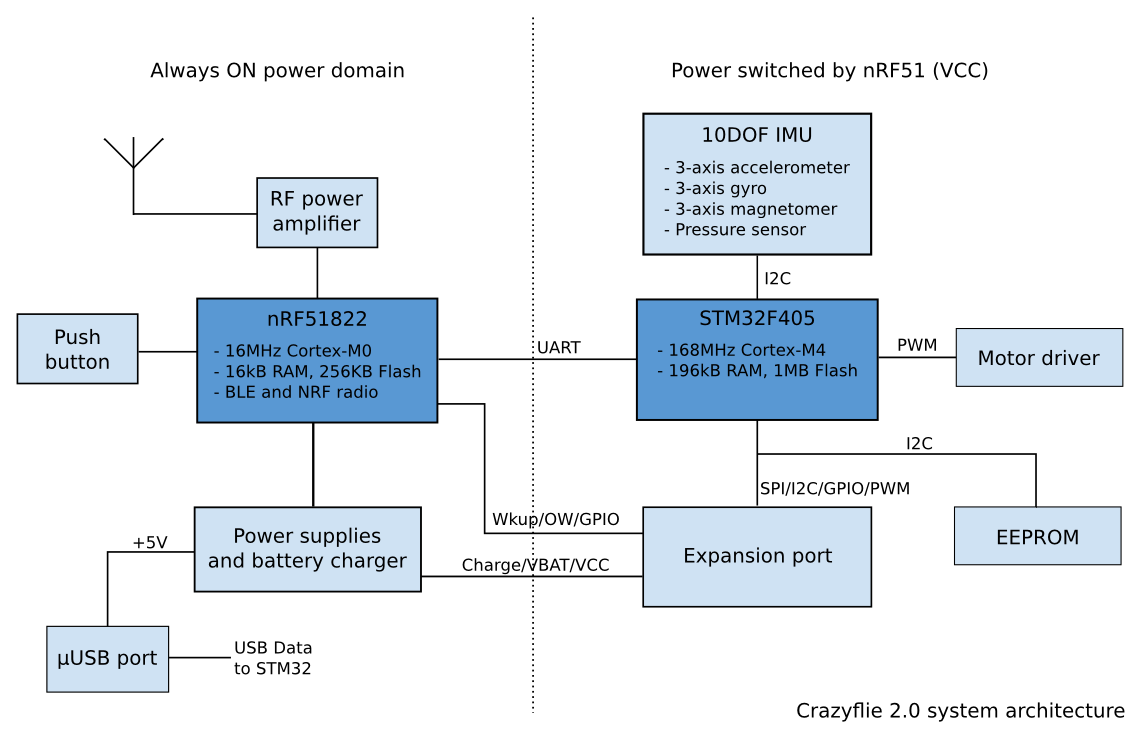
For a long time, communication inside the Crazyflie was fairly simple. The main STM32 microcontroller handled flight control, sensors, motors and most of the system logic. A second microcontroller handled the radio and power management. The two processors communicated using Syslink, a small packet protocol over UART. Syslink was designed for one fixed connection between two known processors. Both sides were developed together, the number of packet types was limited, and there was little need for discovery or elaborate flow control.
This worked quite well for the system it was designed for.
Crazyflie 2.0 system architecture
Over time, however, the Crazyflie platform has changed. More and more expansion decks contain their own processors, firmware and internal state. Some decks are no longer simply collections of sensors connected over I2C or SPI. They are small embedded systems of their own. This has made communication between processors a recurring part of the platform rather than a special case.
Most of what we are talking about in this blog post is very much work in progress: this is a work that we are doing as part of yet another deck that will have an microcontroller.
From Syslink to CPX
Syslink was created for one link between two processors. Later, when developing the AI deck, we encountered a different problem. The system contained several processors and several communication links. Packets could travel between the Crazyflie STM32, the ESP32, the GAP8 and a computer connected either through Wi-Fi or through the normal Crazyradio path. This led to CPX, the Crazyflie Packet eXchange protocol. One of its main roles is routing packets between processors and transports.
CPX solved an important practical problem, and routing is still useful. At the same time, our experience with it has shown that not every processor link needs the whole routed communication model. For a connection between two known processors, requiring routing and application functions to be part of the same protocol can make the stack heavier than necessary.
The current work is therefore not intended to replace CPX. Instead, we are trying to separate the different responsibilities more clearly. CPX could eventually be one of the services transported over a lower-level peer-to-peer link when routing is required.
Yet another processor on a deck
We are currently working on a new deck with a processor that needs to communicate with the Crazyflie. The fastest solution would have been to create another deck-specific UART protocol. The endpoints are known, the initial set of commands is fairly small, and such a protocol would probably have been finished much earlier. That would have been a completely reasonable engineering choice but it would also have added one more custom processor protocol to the platform.
We expect processor-based decks to become more common, so we decided to use the this new deck as an opportunity to work on something more reusable. The new deck does not strictly require all the infrastructure we are building. Rather, it provides a real product in which we can develop and test a communication model that may also be useful elsewhere.
Building the stack in layers
One lesson from Syslink and CPX is that we should avoid putting every communication concern into one protocol. The current new design is split into layers:
physical transport ↓ transport binding ↓ peer-to-peer Link ↓ services such as Control, CPX or Console
The physical transport may be UART, SPI, I2C or another suitable connection.
A transport binding handles the details required to move frames over that transport, such as framing, integrity checks and resynchronization.
Above this is the Link between two embedded peers. It is responsible for establishing a communication session, negotiating compatible parameters, discovering available services and managing bounded buffers.
The Link does not need to understand Wi-Fi configuration, console text or routed CPX packets. These belong to services above it. This separation is important. It allows a simple product to expose only the services it needs, while a more complex system can add routing, structured control, console traffic or other services without changing the basic Link.
The initial implementation uses UART for our new deck, but the communication model itself is not intended to be UART-specific.
A first useful example: Console
Since starting this work, we have implemented a first Console service on top of the new Link.
This also led to a more generic console interface in the Crazyflie firmware. Instead of assuming that all console output comes from the main STM32, the Crazyflie can now expose several console sources. With the current prototype, a client can receive the Crazyflie console, the new deck console, or both. The available consoles can be queried, and by default the normal Crazyflie console continues to behave as before. This is a fairly small feature, but it is a good example of what the architecture is intended to make possible.
Today, the nRF51 radio microcontroller is largely opaque from a debugging point of view. This was quite intentional in the original Crazyflie architecture: the STM32 was the processor we expected users to develop on, while the nRF51 mainly provided supporting functions such as radio and power management. That boundary has become less clear over time. The radio firmware has grown more capable, and both we and some users increasingly work on it directly. If the nRF51 eventually uses the same Link model, it could expose the same Console service. The existing client-side console infrastructure could then show its output without requiring another custom protocol and another special debugging path.
This is the kind of reuse we are looking for.
Control and reusable capabilities
Another service we are exploring is Control.
Control provides a structured way to get values, set values and call commands. It is somewhat similar to an RPC interface, but it also exposes organized sets of readable and writable state. Within Control, related functionality can be described using versioned contracts.
Wi-Fi provisioning is a useful example: adding Wi-Fi support to the AI deck was not only a matter of implementing a command in the deck firmware. The Crazyflie needed to forward the operation, the client library needed an API, and a user-facing tool was required to configure the connection. A future Wi-Fi-enabled deck would otherwise need another product-specific implementation of much of the same path.
With a common Wi-Fi contract, a deck could advertise through its Control service that it supports Wi-Fi provisioning. Generic software could discover this capability and use an existing interface for it, without needing to know which deck or processor implements it. More importantly this means that we can tie Wifi credential to a Crazyflie and not to the deck: for our current work we have decided to store the wifi credential in the Crazyflie. This means that, once setup, the Crazyflie will connect the same wifi network independent of which wifi-capable deck is attached to it. It makes the system much easier to work with. We may update the AI deck to follow the same model in the future.
The same idea can apply to much simpler features. Several decks contain visible RGB LEDs. Instead of every deck exposing a different way of setting a color, they could implement one common LED-control contract and use the same client API.
This is the higher-level counterpart to reusing the Link. The Link avoids rebuilding processor-to-processor communication, while services and contracts make it possible to reuse functionality above it.
Where this could lead
The protocol developed for our new deck is not yet a complete Syslink2 specification for the whole Crazyflie ecosystem. The current work mainly demonstrates the point-to-point Link architecture: sessions, service discovery, versioning and flow control based on actual available buffers. Console already provides a concrete service on top of it, while Control and its contracts are still more exploratory. There are also larger questions we are deliberately leaving outside the first Link. Routing remains a separate concern, and CPX may continue to provide it where it is needed.
More generally, discoverable services could make parts of the Crazyflie platform easier to extend. Today, replacing or experimenting with a subsystem often requires changes across several parts of the stack simply because both ends need to know exactly what hardware is present. If processors can instead advertise standard services and capabilities, some of those dependencies could become looser. For example, a future radio processor could expose a radio service instead of being identified only by its position in the hardware architecture. In principle, another processor or even a deck could expose a compatible service while the rest of the system continues to use the same interface.
This is still very much a direction rather than a finished architecture, but it is one of the possibilities that makes this work interesting to us. The new deck gave us a practical place to start. So far, the layered model seems to fit both our immediate use case and some of the communication problems we expect to encounter more often in future Crazyflie platforms.